Ինչպես պաշտպանել հաղորդագրությունները Telegram-ում, որպեսզի ոչ ոք չկարդա դրանք

Վերջին մի քանի ամիսների ընթացքում Դուրովի մտահղացումը բախվել է նոր օգտատերերի աննախադեպ հոսքի: Ոմանք եկել են Telegram՝ Ռոսկոմնադզորի կողմից սոցիալական ցանցերի արգելափակման պատճառով։ Մյուսները փնտրում են ընթացիկ նորություններ՝ առանց գրաքննության և քարոզչության: Հետևաբար, հիմա ժամանակն է համոզվելու, որ մեսենջերում հաղորդակցությունը դառնում է իսկապես անվտանգ և մասնավոր:
Oragir.live առանձնացրել է մի քանի ուղիներ, որոնց միջոցով կարող եք պաշտպանել հաղորդագրությունները Telegram-ում, որպեսզի ոչ ոք չկարդա դրանք:

Չաթերը, որոնք Telegram-ն օգտագործում է լռելյայնորեն, չեն օգտագործում ծայրից ծայր ծածկագրում: Ի՞նչ է դա նշանակում։ Մի խոսքով, ծառայությանը հասանելի է ոչ միայն մետատվյալները, այլև ձեր նամակագրության ողջ տեքստը:

Այս պահին, ըստ Telegram-ի, այս տեղեկատվությունը երրորդ կողմերին չի տրամադրվում։ Սակայն գաղտնիության քաղաքականությունը կարող է փոխվել ցանկացած պահի: Միևնույն ժամանակ հավելվածում ծայրից ծայր կոդավորումը դեռ կա: Դա պարզապես օգտագործելու համար է, դուք պետք է սովորականից ավելի խորը մտնեք կարգավորումների մեջ:
Ինչպե՞ս ստեղծել «գաղտնի» չաթ․
Բացեք ձեր զրուցակցի պրոֆիլը: Գտեք վերևի աջ կողմում երեք կետ ունեցող կոճակը: Բացվող ընտրացանկում ընտրեք «Սկսել գաղտնի զրույցը»:
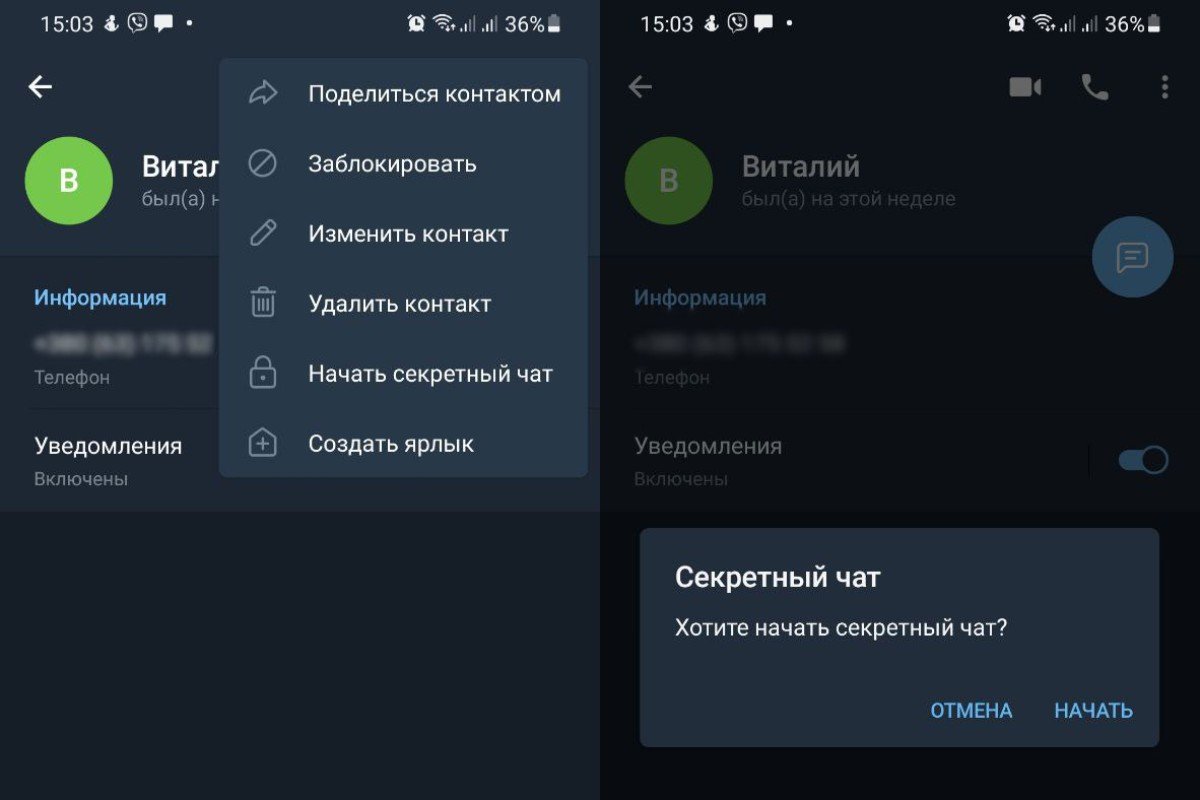
Դրանից հետո ծրագիրը ևս մեկ անգամ կպարզաբանի. «Ցանկանու՞մ եք գաղտնի չաթ սկսել»: Կտտացրեք «Սկսել» և գնացեք նամակագրության պատուհան: Այս զրույցի բոլոր հաղորդագրությունները կոդավորված են, սերվերների վրա հետքեր չեն թողնում և ջնջվում են ժամանակաչափի միջոցով:
Կարգավորումներ ավելի շատ պաշտպանության համար․
Ձեր հաշիվն ավելի ապահով դարձնելու համար հետևեք ստորև ներկայացված հրահանգներին: Դա անելու համար անցեք մենյու և դրա ներքևում ընտրեք «Կարգավորումներ»: Այն հեշտությամբ ճանաչելի է հանդերձանքի պատկերակով:
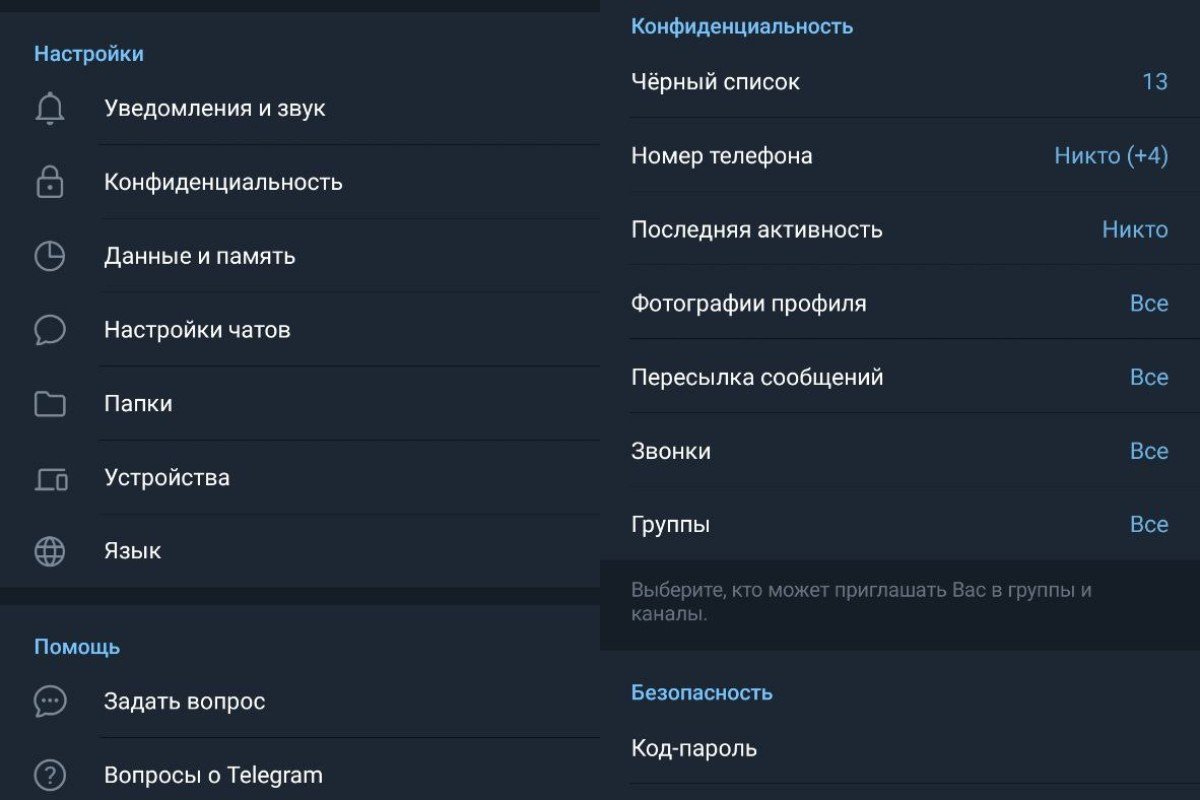
Նախ, համոզվեք, որ ձեր նամակագրությունը չի կարդացվում, եթե ձեր ապակողպված հեռախոսը թողնում եք առանց հսկողության: Դա անելու համար բացեք «Գաղտնիություն» բաժինը:
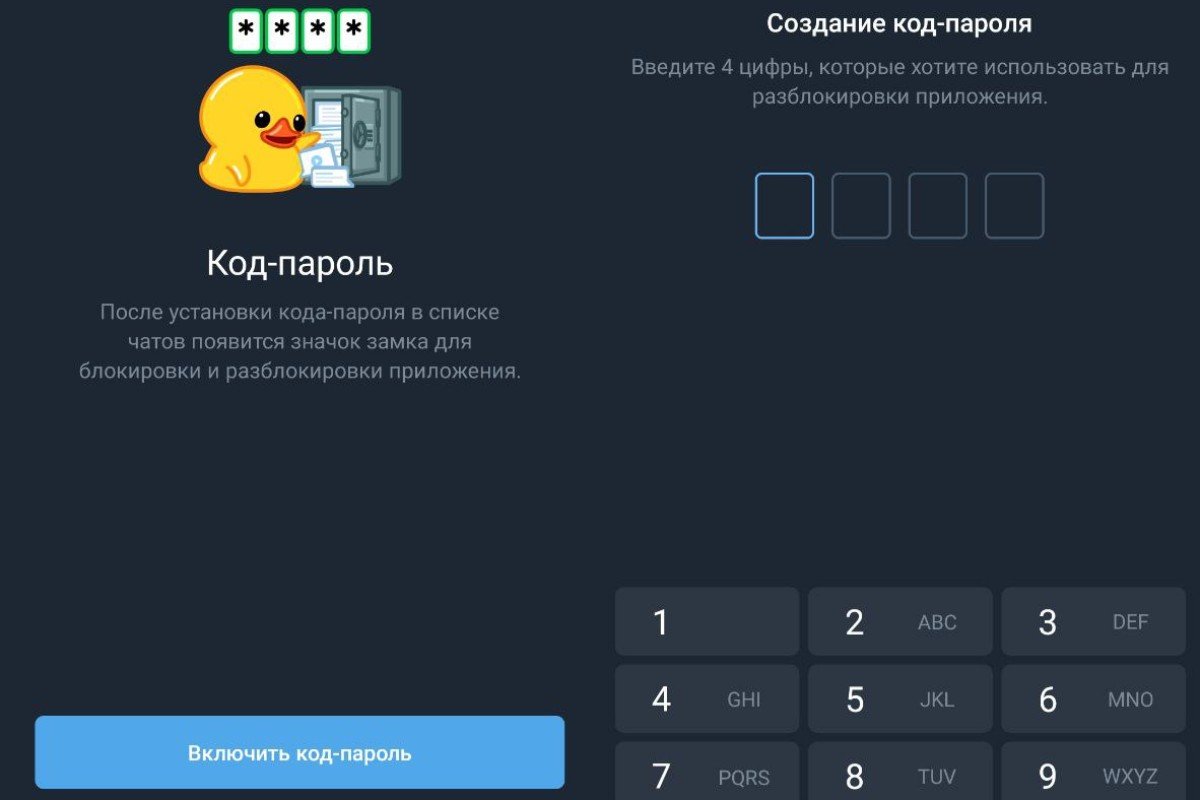
Այնուհետև ընտրեք «Passcode» և սեղմեք «Enable Passcode»: Ծրագիրը ձեզ կխնդրի մուտքագրել չորս թվեր, որոնք դուք կօգտագործեք այն ապակողպելու համար: Գտեք հիշվող կոդ, հարցրեք այն և հաստատեք այն:
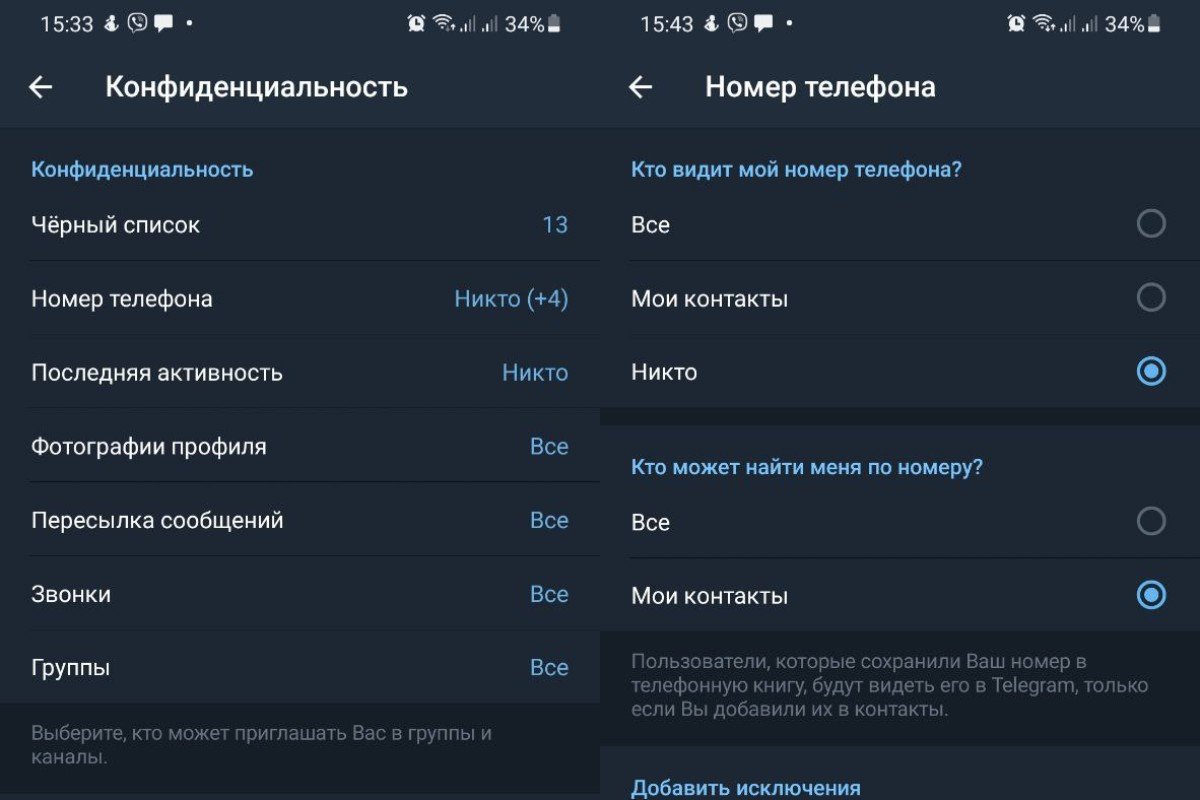
Նույն «Գաղտնիություն» բաժնում անցեք «Հեռախոսահամար» ենթաբաժին: Իսկ դրա մեջ «Ով է տեսնում հեռախոսահամարը» դաշտում ընտրել «Ոչ ոք» կետը։ Նույն տեղում «Ով կարող է ինձ գտնել ըստ համարի» դաշտում ընտրել «Իմ կոնտակտները» կետը:
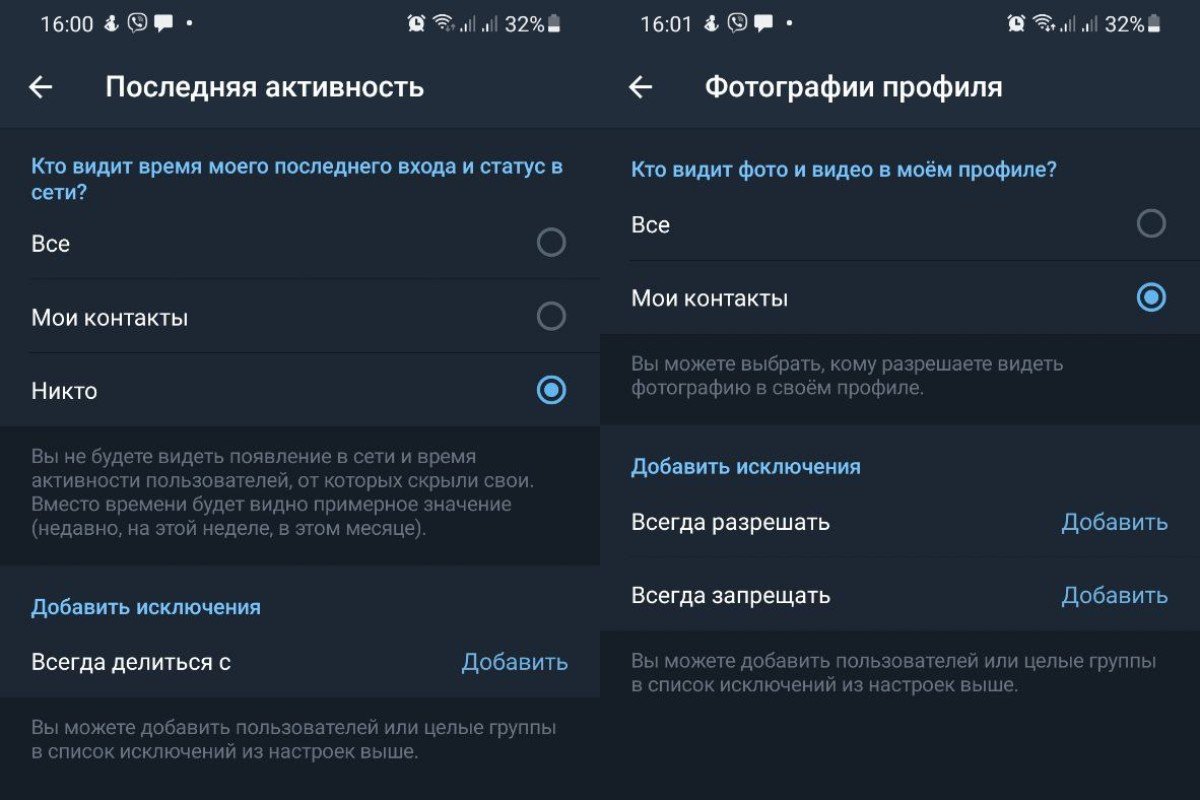
Հաջորդը, անցեք «Վերջին գործունեություն» ենթաբաժին: «Ով տեսնում է իմ վերջին մուտքի ժամանակը և առցանց կարգավիճակը» դաշտում ստուգեք «Ոչ ոք» կետը: «Ով տեսնում է լուսանկարներ և տեսանյութեր իմ պրոֆիլում» - դրեք «Իմ կոնտակտները»:
Հնարավո՞ր է հետևել մարդուն՝ օգտագործելով իր սմարթֆոնի խոսափողը և տեսախցիկը։ Փորձագետներն ասում են, որ դա հնարավոր է: Ընդ որում, դա կարող են անել ոչ միայն հարձակվողները, այլեւ անվնաս, առաջին հայացքից, գովազդատուները։ Այդ իսկ պատճառով ավելի ու ավելի շատ մարդիկ ցանկանում են գաղտնի պահել իրենց տվյալները: Նրանց համար մենք ձեզ ասում ենք, թե ինչպես բացահայտել և անջատել հեռախոսի գաղտնալսումը:
 Ucom Supports AI-Powered Camera Installation for Nature Conservation
 Unibank Becomes Title Sponsor of Alashkert Football Club
 Sergey Smbatyan’s Music for Future Foundation and the Lang Lang International Music Foundation Invit...
 Dmitry Ishkhanov Opens the New Steinway’s Concert Life in Pardubice
 Ucom Fellowship Participants Meet Ralph Yirikian at Ucom
 IDBank and the “Dekavva Fund” Stand with People from Artsakh
 From Car Selection to Purchase – All in One Place: Ameriabank to Present its Myar.am Platform and S...
 Ucom and FAST Bring Together Artificial Intelligence and Green Innovation